
Lounge - Groups & Events
Lounge TechnologyEvents
0.00.00 Reviews
- Version
- 33.6.0
- Installs
- 10.00K
- Age Rating
- Teen
Screenshots
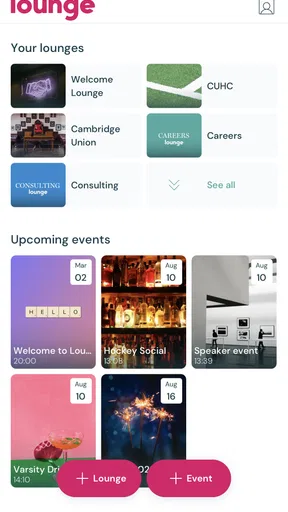
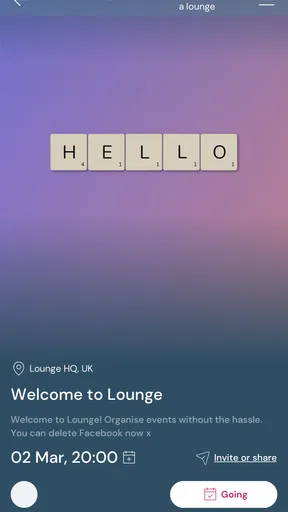
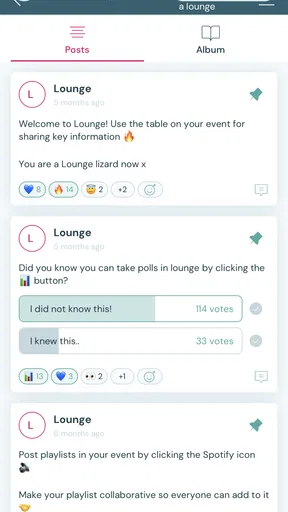
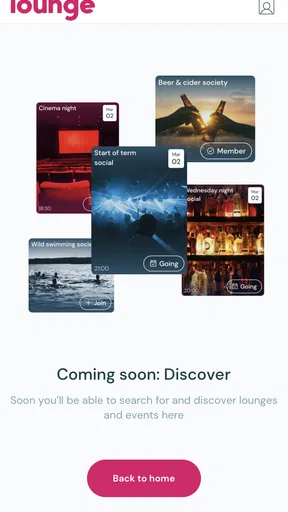
Our Review of Lounge - Groups & Events
 Analysis by Appyee
I approached Lounge as an events app for people who want a quieter place to organize groups, rather than another crowded social feed. Its basic promise is easy to understand: keep your groups and events together without surrounding them with unrelated distractions. After spending time with that idea, I found the app most interesting not because it tries to do everything, but because it focuses on a narrower problem: giving a group a shared space for plans, conversations, and event-related coordination.
That focus also creates an important question about trust. An app that sits close to your social life can become useful very quickly, but it can also become uncomfortable if you do not understand what you are sharing, who can see it, or how much control you have over participation. My view of Lounge is therefore practical and cautious. I looked at how it fits into everyday group planning, where its simplicity helps, and where a person should pause before moving important conversations or personal details into it.
What Lounge is trying to improve about group planning
The developer behind the app is Lounge Technology, and the product belongs to the events category. It is free to use, carries a Teen content rating, and supports devices running Android eight or later. Its current version is 33.6.0, and the app was released on May 3, 2022. Those details place it in the role of an accessible group-and-event tool rather than a specialist platform for ticket sales, professional conferences, or large-scale event management.
In practical terms, I see Lounge working best when a group needs one recognizable home for a plan. That could be a recurring club, a group of friends arranging a weekend activity, a school-related community, or a local interest group that does not want every update mixed into a general-purpose social network. The value is not necessarily in replacing every communication tool. Instead, it is in giving the group a more deliberate setting where event-related information can stay connected to the people who need it.
This distinction matters because the usual alternatives often pull users in opposite directions. A general messaging app is fast and familiar, but important details can disappear beneath casual conversation. A social network may offer event tools, yet also brings feeds, recommendations, advertising, and unrelated notifications. A calendar app is excellent for dates and reminders, but it usually lacks the social context that explains who is attending and what the group has agreed to do. Lounge sits between those options, with a clearer group identity than a calendar and less surrounding noise than a broad social platform.
I would not describe that as an automatic advantage for everyone. If your group already communicates smoothly in a messaging app and rarely loses information, adding Lounge may feel like another place to check. The app makes more sense when a group has repeated plans, several participants, or a need to separate organized activity from everyday chatting. The narrower the use case, the more convincing its focused design becomes.
A realistic everyday workflow
Imagine a group that meets for a monthly activity. In a typical messaging thread, the original plan may be followed by jokes, side conversations, photos, and unrelated questions. When the next meeting approaches, someone has to search backward to find the time, location, or latest decision. A dedicated group-and-event space can reduce that friction by giving the plan a stable context instead of forcing everyone to reconstruct it from a scrolling conversation.
My practical tip is to create the group structure around how people actually participate, not around every possible topic. Keep one space for the recurring activity and use the event itself for the details that change from one occasion to another. This makes it easier for a new participant to understand what the group is for and reduces the temptation to post sensitive personal information simply because the space is convenient.
There is also a useful trade-off here. A focused space can improve clarity, but only if participants agree to use it consistently. If half the group confirms attendance in Lounge while the rest answer in private messages, the organizer still has to reconcile several sources. The app can provide a home for coordination, but it cannot solve the social habit of scattered replies on its own.
Trust begins with visible choices
For an app connected to groups and events, I pay attention to more than the interface. I want to know what I am being asked to share, whether participation feels voluntary, and whether the app gives me understandable choices instead of making privacy decisions invisible. Lounge’s focused purpose is reassuring in one limited sense: it does not present itself as a broad entertainment feed that needs constant attention. A smaller scope can make it easier for users to think about why they are joining.
Still, a quiet design should not be confused with a complete privacy guarantee. The presence of groups and events means that users may naturally enter names, schedules, locations, attendance plans, or personal comments. Those details can be sensitive even when they seem ordinary. I recommend treating every group as a real audience, not as a private notebook. Before posting, I ask myself whether I would be comfortable with every member seeing the information and whether the detail is genuinely needed for the event.
That habit is especially important for younger users because the app is rated Teen. Parents and guardians may also want to discuss which groups a teenager joins, what information belongs in an event, and how to respond if a conversation becomes uncomfortable. The rating is a useful context marker, but it should not replace active judgment about the people inside a particular group.
Account control and the moments that deserve caution
The most data-sensitive moments in a group app are often ordinary actions: joining a group, creating an event, inviting someone, writing a comment, or sharing a meeting detail. Each action can expand the audience for information that originally felt limited. I would therefore start with a low-risk test group rather than immediately moving a large community into the app. Use a neutral event, observe who can see it, and learn the participation flow before adding addresses, travel plans, or other personal details.
I also recommend separating coordination from unnecessary identification. If an event only needs a meeting time and a general location, there may be no reason to publish a full home address or a detailed personal schedule. If the group includes people you do not know well, keep the first event deliberately modest. This is not a criticism of Lounge specifically; it is a sensible boundary for any service that brings multiple people into a shared digital space.
Account controls matter just as much as posting controls. A user should be able to make deliberate decisions about joining, leaving, muting, or otherwise reducing participation when a group no longer feels useful. I would look for those choices before committing to a busy community. If leaving a group feels unclear, or if notifications are difficult to manage, the app becomes more demanding than its distraction-free idea suggests.
My advice is to review the app’s visible prompts and settings during setup rather than tapping through them quickly. Pay attention to invitations, audience wording, notification choices, and any request that seems unrelated to the event you are trying to organize. When an app gives a clear explanation at the moment a choice matters, I consider that a positive sign. When a choice is vague, I keep the shared information minimal until I understand the consequences.
Where user agency matters most
Lounge is most convincing when it lets the group decide how much structure it needs. A small group of friends may want a simple place to keep an activity organized. A larger community may need clearer habits about who creates events, who posts updates, and how old information is handled. The app can support the setting, but the group still needs its own rules. I would agree on basic expectations early: what belongs in the group, which details should stay private, and where urgent communication should happen if the app is unavailable or someone misses a notification.
That last point is easy to overlook. An events app should not become the only channel for important time-sensitive information unless every participant reliably checks it. For a casual plan, a missed update may only cause inconvenience. For travel, safety, or attendance changes, I would keep a second communication route available. Lounge can organize the shared plan, but I would not treat any single app as a guarantee that everyone has seen a change.
There is another agency issue: the difference between joining because you want to and joining because the group expects it. A focused app can make participation feel more organized, but social pressure can still exist. Organizers should avoid treating app membership as proof of commitment, and participants should feel able to decline an event without having to reveal more personal information than necessary. That human boundary is just as important as any setting.
Who will appreciate the focused approach
I can recommend Lounge to people who regularly coordinate groups and feel that ordinary chat threads are too messy. It is a sensible candidate for recurring communities, informal clubs, friend groups with ongoing activities, and organizers who want event-related discussion to have a dedicated home. The free price also lowers the barrier for trying it with a small group before deciding whether it deserves a permanent role.
The app may also suit people who dislike the attention economy of larger social platforms. If your main goal is to see group plans without browsing an endless stream of unrelated material, Lounge’s narrow identity is appealing. The experience is easier to evaluate because the reason for opening it is straightforward: check a group, review an event, or contribute to a plan.
I would be more hesitant to recommend it as the sole tool for formal event operations. If you need ticket payments, detailed registration workflows, advanced scheduling, professional attendee reporting, or a public discovery system, a dedicated event-management service may be a better match. Lounge’s strength is the shared group context, not the promise of replacing every specialized function around an event.
I would also skip it when a group is already perfectly organized elsewhere. Every additional app introduces another login, another notification stream, and another place where information can become outdated. The right question is not whether Lounge can hold your group, but whether it removes enough confusion to justify asking everyone to use it.
What I would do before inviting a whole group
I would begin with a small pilot involving only the people who actively organize the event. First, create a basic group purpose that can be explained in one sentence. Next, add one low-risk event and observe how invitations, updates, and replies work in practice. Then ask participants whether they understood the audience for each post and whether the notification flow helped or interrupted them.
That trial reveals more than a quick installation. It shows whether the group can maintain one source of truth, whether people know where to find changes, and whether the app’s simplicity remains useful once several voices are involved. If the pilot produces duplicated conversations or uncertainty about who saw an update, keep the group’s important information in a more familiar channel until the process improves.
I would also establish a cleanup habit. Old events can contain dates, locations, and attendance context that no longer needs to remain prominent. Review the group occasionally, remove details that have served their purpose where the available controls allow it, and avoid treating the event space as a permanent archive of everyone’s movements. This is a practical privacy measure and also keeps the group easier to navigate.
My cautious verdict on Lounge
Lounge is a focused events app from Lounge Technology that makes the strongest case for itself when a group wants organization without the distractions of a broad social network. I like the idea of keeping recurring plans in a dedicated setting, and I can see why a club or active friend group would prefer that over searching through a busy chat thread. Its free availability and support for Android eight and later make a small trial straightforward.
My recommendation comes with boundaries. Treat group membership as a real audience, share only what the event requires, and test the visible account and participation controls before moving sensitive plans into the app. Keep an alternative contact method for urgent updates, and do not assume that a focused interface automatically means every detail is private.
For someone who wants a calmer place to coordinate groups and events, I think Lounge is worth trying with a modest, well-defined use case. For users seeking advanced event administration, public reach, or a complete replacement for messaging and calendars, another category of tool will probably serve them better. The best reason to choose Lounge is not that it does everything, but that it may help your group do one important thing with less noise and more intention.
Verdict
Strengths of Lounge - Groups & Events
- Easy way to discover local groups and events matching your interests.
- Useful tools for organizing meetups, activities, and community gatherings.
- Group conversations help members coordinate plans in one place.
- Supports networking with people who share similar hobbies or goals.
- Event details and updates are convenient to access from the app.
Limitations of Lounge - Groups & Events
- Some communities may have limited activity or infrequent events.
- Notifications can become excessive when groups are highly active.
- Local event coverage depends heavily on the size of your area.
- Public group interactions may raise privacy concerns for some users.
- Certain features or events may require account details or extra permissions.
Similar Picks in This Category
View All
Easy Quran Mp3 Audio Offline
Muslim Worldapp4.7

Invitation Maker: Cards & RSVP
Greetings Island4.9

StubHub - Live Event Tickets
StubHub4.3

Fever: Events & Tickets
Fever Labs4.7

Epic Freebie Games Radar
Arioch Pds - Apps & Games4.4

Invitation card Maker, Design
Splendid App Maker4.9
Frequently Asked Questions
What is Lounge - Groups & Events used for?
Lounge - Groups & Events is designed to help people discover, join, and participate in communities centered around shared interests, activities, and local events. After exploring the app, its main focus appears to be social connection rather than private one-to-one messaging. Users can browse available groups, follow conversations, view event details, and potentially meet people with similar interests through organized activities.
How do groups and events work in Lounge?
Groups generally provide a dedicated space for members to communicate, share updates, and coordinate activities. Events are used to organize specific gatherings, including information such as the date, time, location, and participating members. Depending on the group or event settings, you may be able to join directly, request access, respond to invitations, or communicate with other attendees before the activity takes place.
Is Lounge - Groups & Events free to download and use?
The application can generally be downloaded without an upfront charge, but the exact availability of features may depend on the current version, region, or account type. Some social applications offer optional purchases, subscriptions, or paid events, so users should review the app-store listing and payment details before confirming anything. Always check whether an event itself includes a separate participation fee.
Does Lounge require an account and personal information?
You will likely need to create an account to join groups, interact with members, or register for events. The app may request basic details such as your name, profile image, email address, location, or interests to personalize the experience and support community functions. Before signing up, review the privacy policy and permissions carefully, especially if you do not want your profile or location visible to other users.
Is Lounge - Groups & Events safe for meeting new people?
Lounge may make it easier to connect with people through shared communities, but users should still take normal online-safety precautions. Avoid sharing sensitive personal information, verify event details, and communicate through the app until you feel comfortable. For a first meeting, choose a public location, tell someone you trust where you are going, and report suspicious behavior or inappropriate content using the available tools.
